
YouTube Competitor Analysis
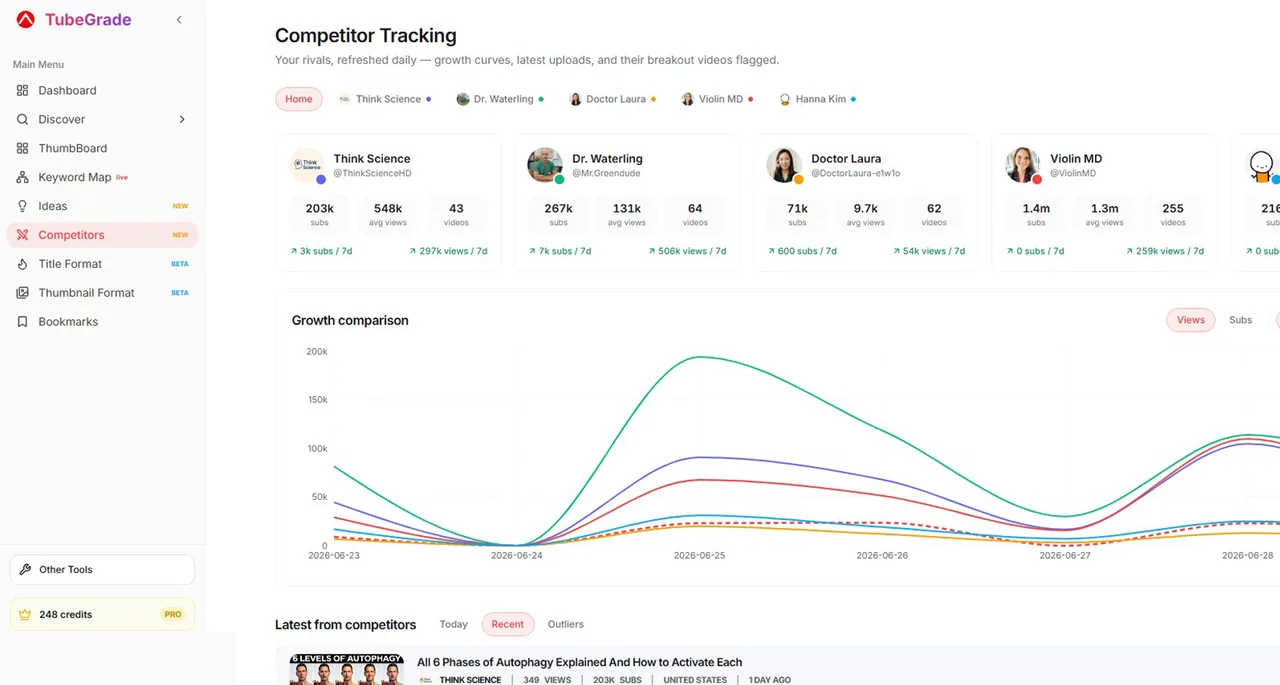
Follow the channels you compete with. TubeGrade checks them every day, charts their growth next to yours and flags the videos that beat their usual views.
How to track your YouTube competitors
- 1
Add up to 5 channels
Paste a channel link, an @handle or a channel ID for each competitor you want to follow.
- 2
TubeGrade checks them every day
Once a day it records each channel’s subscribers and views and picks up their latest uploads, with a fresh outlier score for every video.
- 3
Compare and learn
Chart their subscriber or view growth by day, week or month — with your own channel as an extra line if you have linked it — and see which of their recent videos are breaking out.
What you can see for each competitor
Everything comes from public YouTube data — no access to anyone’s channel is needed.
- Growth chart — subscribers or views over time, all competitors on one chart
- Latest uploads — one merged feed across every tracked channel, with an “outliers only” filter
- Each channel’s last 30 videos with their outlier scores
- Your own channel on the same growth chart, once you link it in TubeGrade
Why track competitors by outliers
A competitor’s total views mostly reflect their size. Their outliers show what is working for them right now: the topics, titles and thumbnails that pulled in far more viewers than their usual videos. Spot those early and you can make your own version while the topic is still rising.
Free vs Pro
Competitor Tracking is part of TubeGrade Pro and does not use credits. You can track up to 5 channels at a time and swap them whenever you like.
Frequently asked questions
How many channels can I track?
Up to 5 at a time. You can remove a channel and add a different one whenever you want.
How often is competitor data updated?
Once a day. Each tracked channel’s subscribers, views and latest uploads are refreshed daily, and that history builds up into the growth chart.
Can I compare competitors with my own channel?
Yes. Link your own YouTube channel in TubeGrade and it appears as an extra line on the competitor growth chart.
Do I need access to my competitors’ channels?
No. TubeGrade only uses public YouTube data — the same numbers anyone can see on a channel page.
Is competitor tracking free?
It is a Pro feature. Without Pro you can still check any channel’s public stats and growth with the free Channel Stats tool.
Related TubeGrade features
Start tracking your competitors
Competitor Tracking is included in TubeGrade Pro.