
YouTube Thumbnail Inspiration
A visual board of thumbnails for the topics you care about, each with its outlier score — and a visual search that finds thumbnails that look like yours.
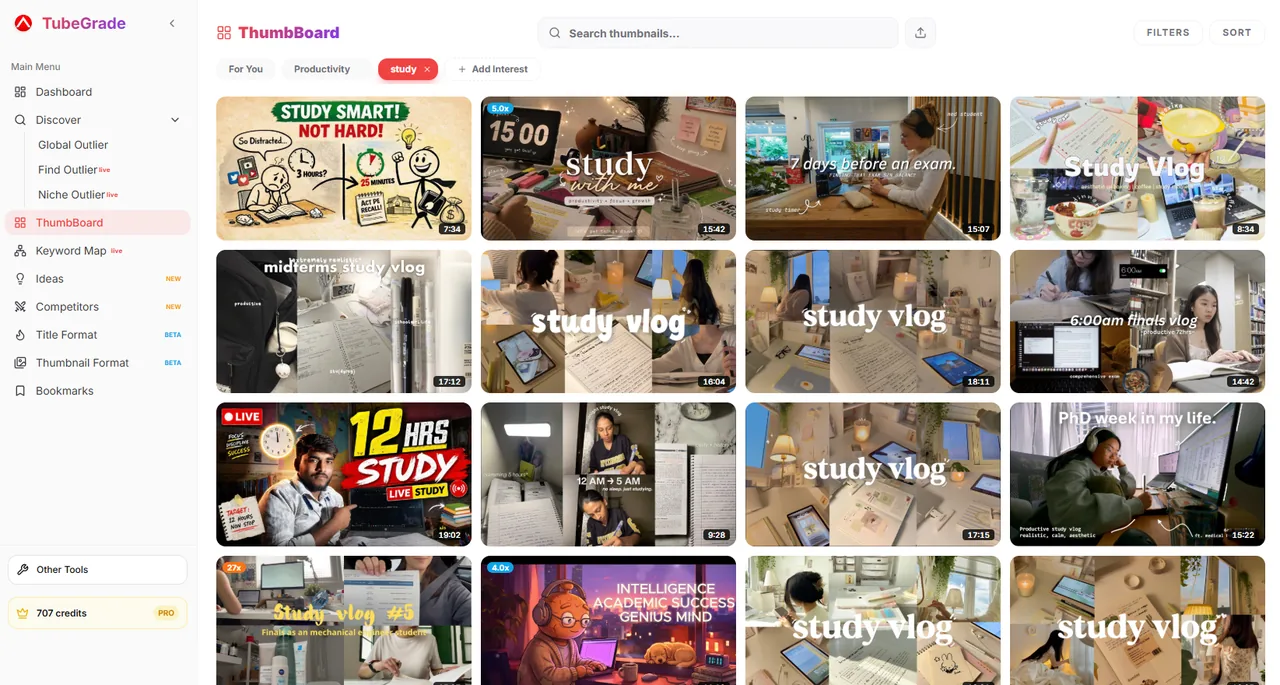
How to find thumbnail inspiration with ThumbBoard
- 1
Pick your vibes
Choose topics from presets or add your own, like “productivity” or “true crime”. ThumbBoard fills a board with thumbnails of videos whose titles match each one.
- 2
Filter and sort
Narrow the board by upload date, channel size and channel country, and sort by relevance, views, date or outlier score.
- 3
Find look-alikes
Click “More like this” on any thumbnail, or upload your own JPG or PNG, to find thumbnails that look similar.
What each thumbnail shows
Every thumbnail on the board comes from TubeGrade’s video database and carries its outlier score — how many times its channel’s usual views it got — so you can tell a thumbnail that won from one that just looks nice. Strong performers also get a badge such as Algo Hit, Trend Rider, Evergreen or Audience Magnet.
Visual search for thumbnails
“More like this” finds thumbnails that look like the one you picked, weighing the image itself more than the title. Upload your own draft to see which existing thumbnails resemble it — and how those videos did.
Free vs Pro
ThumbBoard is part of TubeGrade Pro and does not use credits. On the free plan you can still browse the first 3 thumbnail formats and use the free thumbnail tools.
Frequently asked questions
What is ThumbBoard?
A board of real YouTube thumbnails for the topics you choose, each showing its outlier score, with filters, sorting and a visual search for similar thumbnails.
Where do the thumbnails come from?
From TubeGrade’s own video database — videos found through searches, niche research, tracked channels and the browser extension. Videos are matched to your topics by what their titles mean.
Can I search with my own thumbnail?
Yes. Upload a JPG or PNG and ThumbBoard finds thumbnails that look like it.
What does the outlier score on a thumbnail mean?
The video’s views divided by its channel’s average views. A 10× thumbnail belongs to a video that got ten times what that channel usually gets.
Is ThumbBoard free?
It is a Pro feature. Free accounts can use the first 3 thumbnail formats and the free Thumbnail Preview and Downloader tools.
Related TubeGrade features
Build your thumbnail board
ThumbBoard is included in TubeGrade Pro.